
The glossary
Published:
Last updated:
WordPress as a web platform – what you need to know about SEO, security and performance
Definition
WordPress is an open-source content management system (CMS) used to create and manage websites. It is the world's most widely used web platform and powers everything from simple blogs to advanced corporate websites and e-commerce solutions.
What is WordPress, really?
WordPress is a PHP-based CMS that uses a database (usually MySQL) to store content. The platform was launched in 2003 and has since grown into a complete publishing system.
There are two variants: WordPress.org – the self-hosted version, where you own and manage the installation yourself – and WordPress.com – a hosted SaaS version with different subscription tiers. When people talk about WordPress in a professional context, they almost always mean the self-hosted version.
How does WordPress work?
WordPress is built on three main parts: the core, which handles pages, users, media and the database connection; themes, which control design and layout; and plugins, which extend the functionality. It is the plugin ecosystem that makes WordPress extremely flexible – but also more complex to manage technically.
Advantages of WordPress
Open source with no licence fee, a very large ecosystem, flexible and customisable, support for advanced SEO, and suitable for both small and large websites. In short, when it comes to websites and integrations, the possibilities with WordPress are endless.
Disadvantages and challenges
It requires maintenance (updates to core, themes and plugins), carries security risks if not managed correctly, can become slow without optimisation and depends on the quality of the hosting. For companies without in-house technical skills, WordPress can mean an ongoing need for external support to handle updates, security and performance.
At SEOS Design we often recommend Webflow as a platform, although we also build with WordPress when it is the right choice for the project. You can read more about why in our article on Webflow vs WordPress.
WordPress and security – what is rarely mentioned
What is rarely mentioned in guides to WordPress is the structural security risk that comes with the system's greatest strength: its flexibility and its enormous library of plugins.
According to Patchstack's security report for 2026, more highly critical security vulnerabilities were discovered in the WordPress ecosystem in 2025 than in the two previous years combined.
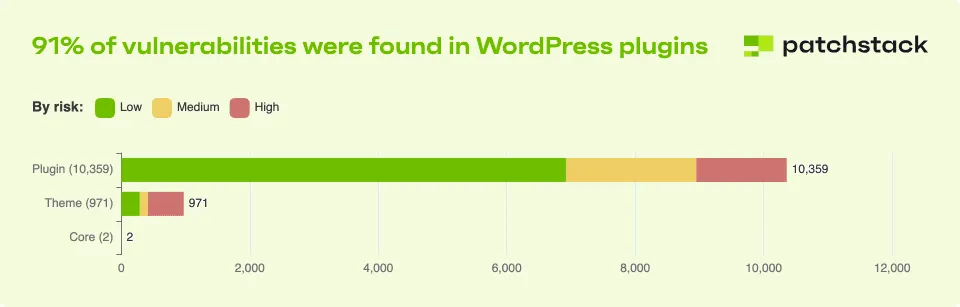
As the chart above shows, the problem is not the WordPress core – which is very secure in itself. The real vulnerability lies in the ecosystem of third-party plugins that WordPress users rely on.
According to the report, vulnerabilities reached new record levels in 2025. The most alarming part is not just the number of flaws, but that 46% of the vulnerabilities had no security patch when they were made public. So you cannot assume your website is secure just because your plugins and themes are up to date. Your security depends on how disciplined you are about removing unnecessary plugins and how actively you monitor the ones you use. For companies without a dedicated technical partner, this often becomes a critical issue that falls between two stools. We cover what you can do about it, and whether a coded website is more secure, in Is WordPress secure?.
WordPress and SEO
WordPress is fundamentally SEO-friendly: you can control the URL structure, customise metadata and implement schema markup, and there are powerful SEO plugins. But the SEO results depend entirely on how the website is built and optimised – not on the CMS itself.
WordPress and performance – the hidden cost of plugins
One important aspect is how the plugin stack affects performance, and therefore Core Web Vitals, SEO and UX. Every plugin adds code that has to be loaded, and plugins are written to varying standards and with different technical approaches. When you combine ten, fifteen or twenty plugins – which is common on WordPress websites with marketing tools, form plugins, security plugins and SEO plugins – the risk of conflicts, slower load times and poorer INP goes up.
On a well-maintained WordPress installation with a few carefully chosen plugins, this is manageable. On an older installation that has grown organically over time, with many plugins (perhaps chosen without proper research) and an ageing theme, it is a sure recipe for Core Web Vitals problems.
When does WordPress fit?
WordPress is often a good choice when you need a flexible solution, want full control over hosting, are building a content-driven website or want to be able to customise functionality through code. It can, however, be a less suitable choice for companies that prioritise minimal technical maintenance, performance "out of the box" or design control without relying on themes.
Summary
WordPress is the world's most widely used CMS and offers great flexibility through themes and plugins. The platform suits companies that want control and room for customisation, but it needs technical management – above all ongoing security work on plugins – to stay secure, fast and scalable.
Ready for the next step?
Now that you know more about WordPress, you may be wondering what your next step should be.
We are always happy to help and to answer any questions you have.
Book an intro call